
I got a new S Pen with Eraser for my Galaxy Note 2 today. I spent an hour or so trying to figure out how to make it work. I knew that detaching the original pen put it in the correct mode for using it but while the pen was attached, it new S Pen didn’t work.
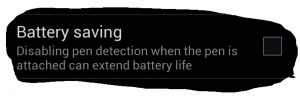
Well after checking all the settings, I finally found one that provided me with the functionality I needed. To use the new S Pen, just uncheck the following setting under the S Pen section in Settings.
Feel free to share.


